Learning Platform
Planning Worksheet
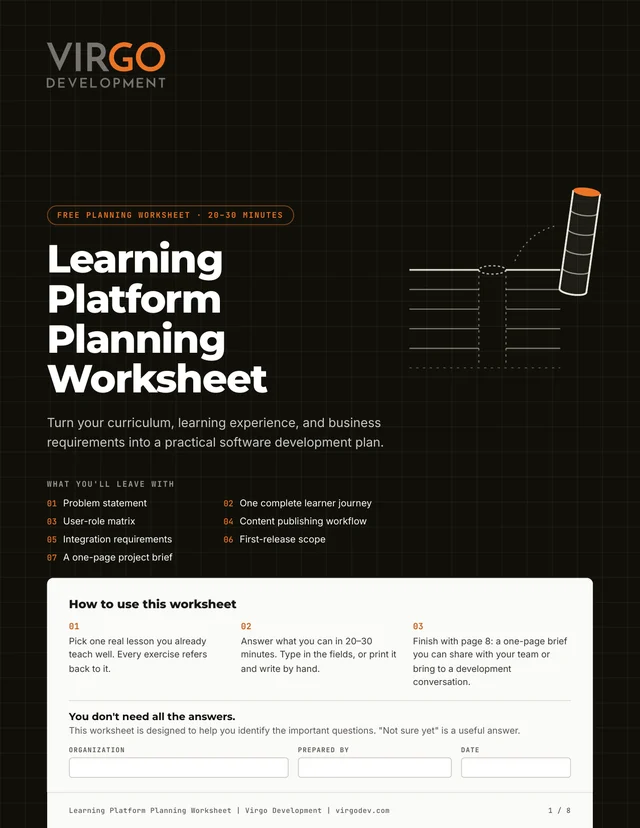
Turn your curriculum and ideas into a practical starting point for development. Identify your users, map one learning experience, prioritize what matters for a first release, and walk into your first development conversation prepared.
From "we need a platform"
to "we know what to build."
The Learning Platform Planning Worksheet is a free, fillable 8-page PDF that helps education businesses turn a curriculum into a practical software plan. Over six short exercises, you trace one real lesson from the learner's first activity to what a parent or teacher sees, then work out the roles, content workflow, business requirements, and first-release scope behind it. The last page pulls it all into a one-page project brief.
It's built on the same method we use with clients, the One-Lesson Trace, which we explain in How to Plan a Custom Learning Platform Before Development Begins. The article stands on its own. The worksheet gives you somewhere to write your answers down.
Education businesses
Enrichment, early learning, music, language, and training programs that already have learners and want software that fits the way they teach.
Curriculum and publishing teams
Teams turning an established curriculum into a digital product, with tools their own staff can use to create and update lessons.
EdTech product owners
Platforms that started on a course tool, a website builder, or an AI-built prototype and now need a clear plan for what to build next.
Six exercises. One
planning brief.
Each exercise produces something specific you can use, and each one includes a short example answer, so you can see what a useful answer looks like.
Define the Opportunity
The business problem, your primary learners, who pays, the experience you want to create, and how you'll know it's working.
Map One Learning Experience
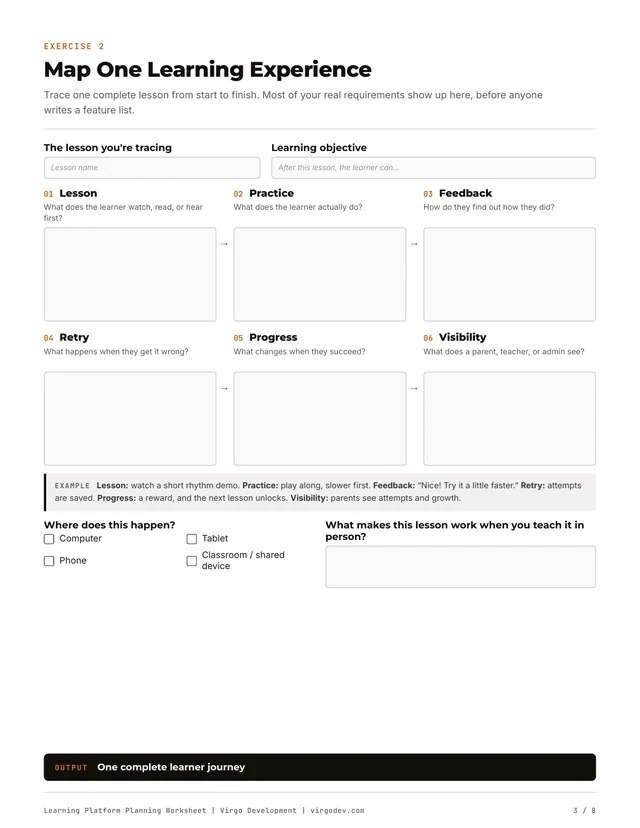
Trace one real lesson through six steps: lesson, practice, feedback, retry, progress, and what parents or teachers see.
Identify Users and Responsibilities
Learners, parents, teachers, administrators, curriculum creators, and billing contacts, plus a simple permissions matrix.
Plan Curriculum and Content Management
What content exists today, who creates new lessons, and who drafts, reviews, approves, publishes, and updates them after launch.
Define Business and Technical Requirements
The software you use today, how people will buy access, access rules, reporting needs, and any existing subscribers to move.
Prioritize the First Release, Then Summarize
Sort capabilities into must-have, later, and needs validation. Then bring everything into a one-page brief with your open questions and next decision.
What a useful answer
looks like.
Here are short answers for a hypothetical music-learning platform for children. It's an illustration of the method, not a description of any client's actual system.
| Planning question | Illustrative answer |
|---|---|
| Business challenge | Learners can watch lessons but have limited opportunities to practice interactively. |
| Primary learner | Children learning to play music |
| Learning workflow | Watch a lesson, practice a rhythm, receive feedback, retry, and track progress |
| Adult involvement | Parents can view individual learner progress |
| Content operations | Curriculum managers can create, edit, and publish activities |
| Business requirements | Subscription billing, family accounts, and learner access controls |
| First release (MVP) | One complete interactive lesson with feedback and basic progress tracking |
You don't need all the answers.
That's the point.
The worksheet is designed to help you find the important questions. "Not sure yet" is a useful answer, and the open questions you write down on page 8 are often the most valuable part.
Open or print it
Type directly into the fillable fields, or print it on standard US Letter paper and work through it with your team.
Pick one real lesson
Choose a lesson you already teach well. Every exercise refers back to it, which keeps the plan concrete.
Spend 20–30 minutes
Answer what you can. Skip what you can't yet. A first pass is meant to be rough.
Bring page 8 to a conversation
Your one-page brief works for an internal planning meeting, or for a free 30-minute Discovery Call with our engineers.
What the worksheet won't ask you for
No technology stack, no hour estimates, no budget, and no technical specification. Those are decisions a good development partner should help you work through during discovery, not homework you need before the first call.
About the
planning worksheet.
Is the Learning Platform Planning Worksheet free?
Yes. It's a free PDF download with no email or form required. If you'd like help with it afterward, you can book a free 30-minute Discovery Call, but that's optional.
How long does the worksheet take to complete?
About 20–30 minutes for a first pass. It's meant to be rough. Answer what you can, write down what you're unsure about, and come back to it with your team.
Can I fill it out on my computer?
Yes. It's a fillable PDF with text fields and checkboxes you can complete in Adobe Acrobat Reader, Preview on a Mac, or most browsers. It also prints on standard US Letter paper if you'd rather write by hand.
Do I need technical knowledge to use it?
No. The worksheet asks about your learners, your curriculum, your team, and your business. It doesn't ask you to choose technology, estimate hours, or write a technical specification.
What should I do with the finished worksheet?
Use page 8, the one-page planning summary, to align your team and to start a conversation with a development partner. You're welcome to bring it to a free Discovery Call with Virgo Development.
Is this only for a custom LMS?
No. The same planning applies whether you end up extending an existing LMS like Moodle or Canvas, integrating tools you already use, or building a custom learning platform. The worksheet helps you work out which one fits.
Bring your worksheet.
We'll help with the rest.
Spend 30 minutes with us on your planning brief. We'll help you sort out what to build, what to integrate, and how to approach your first release, whether that's working with us or not.
- ✓ A rough, half-finished worksheet is fine
- ✓ You'll talk with engineers, not a sales team
- ✓ We'll tell you when an existing LMS is enough
- ✓ You own everything we build